
11.11 + Black Friday + Cyber Monday
Midnight
Edit.
Three distinct styles. Your campaign, everywhere.
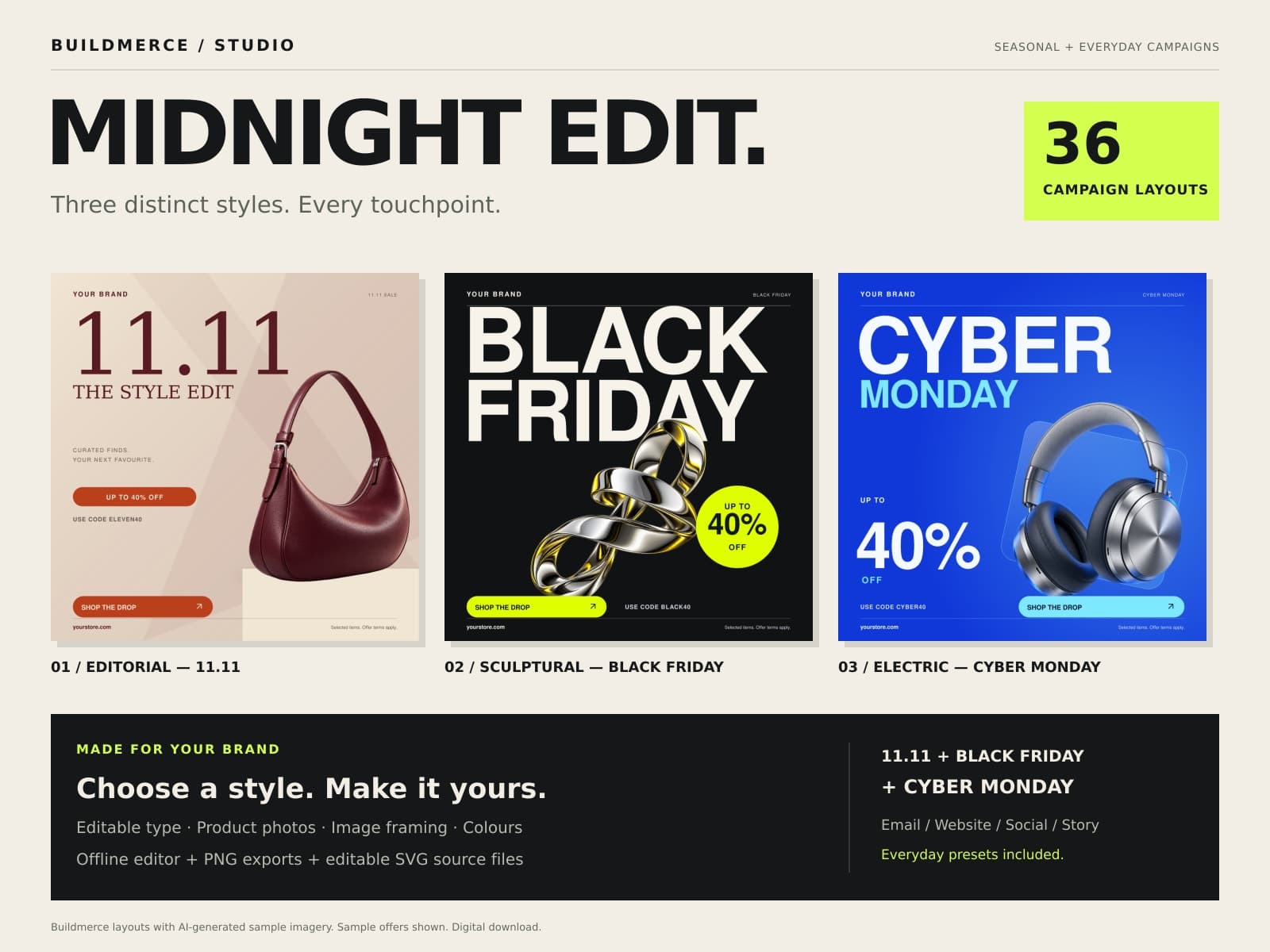
Editorial fashion, sculptural chrome and vivid cobalt tech. Choose a visual style, edit the wording and offer, and fit your own product into 36 seasonal layouts for email, websites and social.
Try one editable Black Friday design with a matching PNG. Delivered free by email.
Midnight Edit free sample
Try the kit before you buy.
Enter your email below. Sender handles confirmation and delivers the sample after you confirm your address.
Your confirmation and sample delivery are handled by Sender. Buildmerce Product Updates should remain optional in the signup form.
If the embedded form is blocked by your browser, open the signup form.
$19 USD, one-time payment. Applicable tax shown at checkout.
Digital ZIP download · No Canva account required.
Three events. Three campaign stages. Four formats.
From the first invite to the final reminder.
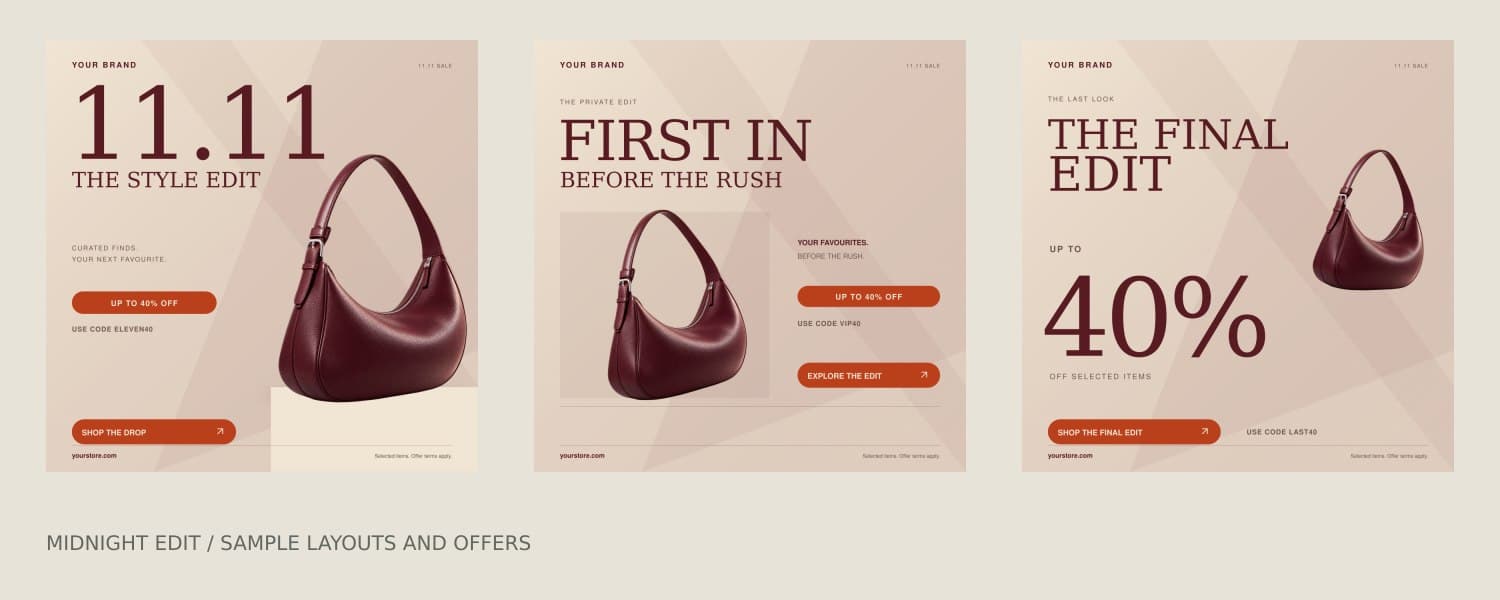
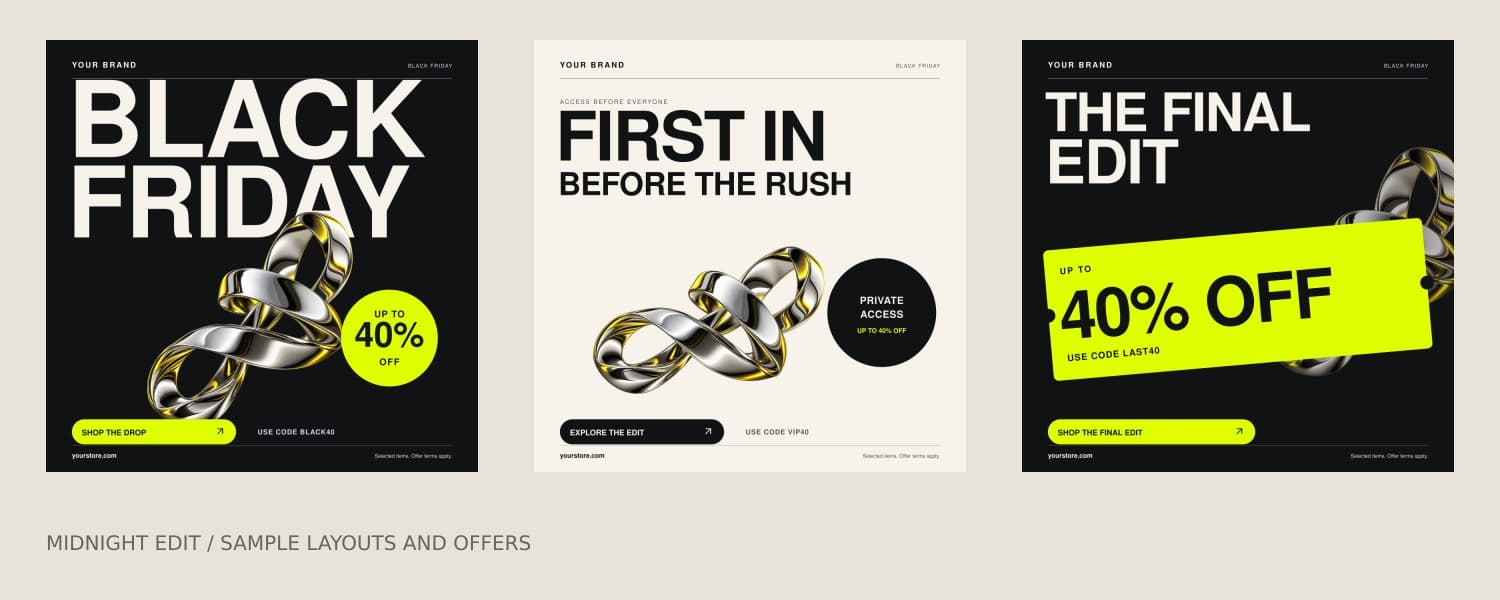
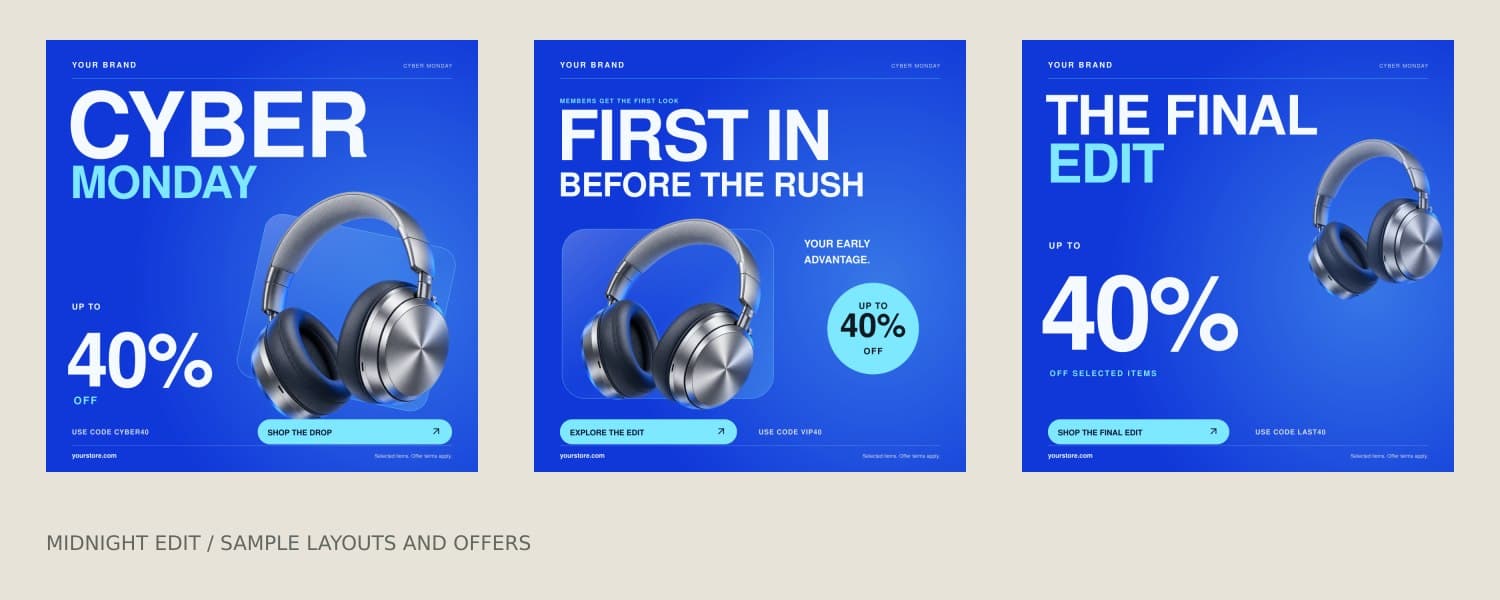
Explore Editorial, Sculptural and Electric collections, with distinct compositions for launch, VIP access and the final reminder. Each stage comes in all four formats for 11.11 / Singles Day, Black Friday and Cyber Monday. The PNGs and matching SVGs are two file types of the same 36 layouts.
Keep creating after November
Your next campaign. Your own words.
Start a flash sale, clearance, new collection or anniversary campaign. Edit the campaign name and both main headline lines in the offline editor. Turn off discount badges and coupon copy when your promotion does not use a discount.
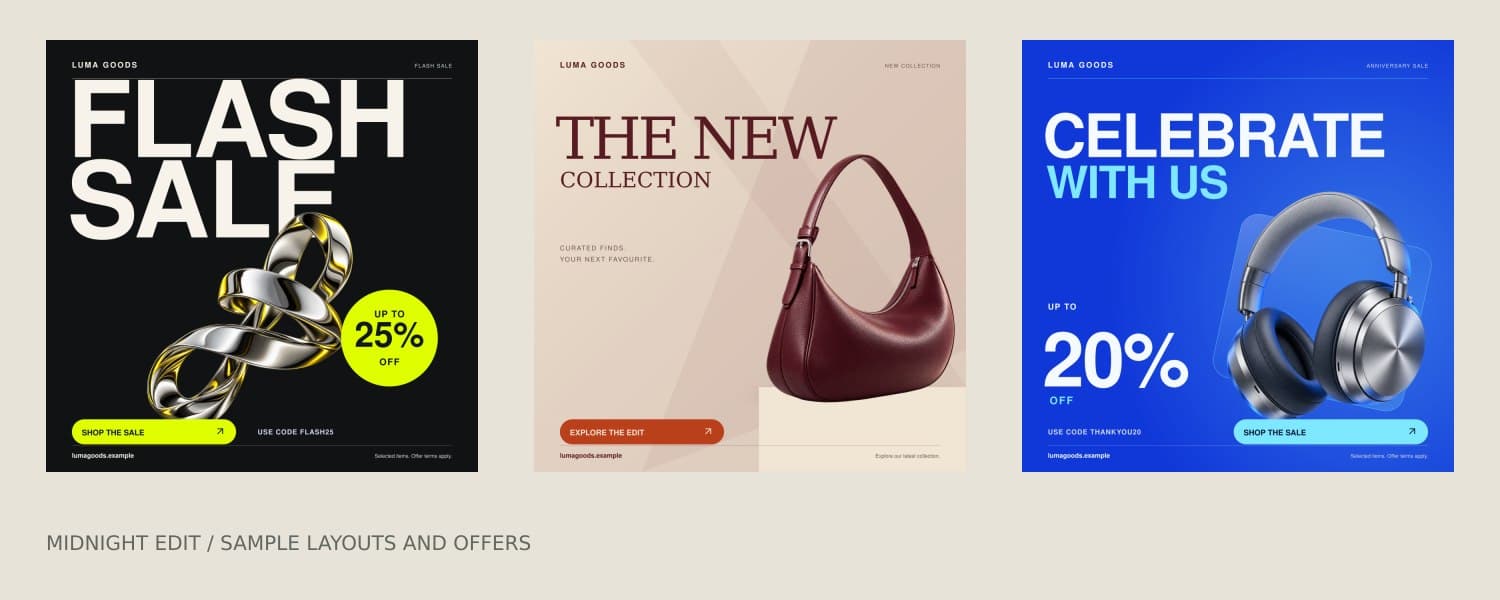
Make it yours
Your brand. Your offer.
Your own product.
- 1
Open
Extract the ZIP and open the included Campaign Studio in a current desktop browser.
- 2
Customise
Choose an event or everyday preset, stage and format. Choose a visual style and edit the headline lines, offer, colours, coupon and brand. Add your product photo and adjust its size and position.
- 3
Publish
Download PNG for publishing or SVG for further editing. Add your real links and coupon in your marketing platform.
What’s in the download
- 36 PNG graphics
- 36 matching SVG source files
- Offline Campaign Studio with editable headlines and four everyday presets
- AI-generated sample imagery with separately editable type and shapes
- Getting-started guide and single-brand commercial-use terms
Version 1.2 · Delivered as a ZIP · One-time purchase
Works with your existing image placements. No storefront plugin or email-platform integration is included.
Read the single-brand usage terms ↓The right shape for every channel.
Email header
1200 × 600 px
Pair with live offer text and a button in your email platform.
Website banner
1920 × 650 px
Add to a landscape banner position in your storefront.
Square social post
1080 × 1080 px
Keep your feed coordinated with your sale.
Vertical story
1080 × 1920 px
Take the same campaign into a vertical format.
For accessible emails, keep essential offer text and a working button as live content alongside the graphic, and add descriptive alt text.
Before you buy.
Can I use this after the seasonal sales?
Yes. Edit the campaign label and two main headline lines, or start with the flash sale, clearance, new collection or anniversary presets. Hide the discount badge for a promotion without a discount. These presets reuse the layout system; the download contains 36 seasonal layouts as 36 PNGs and 36 matching SVGs.
Do I need Canva or a subscription?
No. Extract the ZIP and open Campaign-Studio.html in a current desktop browser. The included editor runs locally. This product does not include Canva template links or guarantee Canva import/editability.
What can I customise?
Choose Editorial, Sculptural or Electric, adjust the image size and position, and change the campaign name, both main headline lines, brand name, colours, discount, coupon, website, CTA and terms. Upload a PNG, JPG or WebP product photo, optionally hide the discount badge and coupon, then export PNG or SVG. Text and shapes are SVG elements; sample artwork is embedded raster imagery, not editable vector artwork. Moving other individual objects requires a compatible vector editor.
What artwork is included?
The bag, headphones and abstract chrome artwork are AI-generated raster sample imagery, included alongside separate editable text and graphic shapes. Upload accurate images of your own products when advertising real inventory. Changing colours does not recolour the internal details of a product image.
How do I receive my files?
After payment, download the ZIP through Lemon Squeezy. Extract the entire folder and open START-HERE.html for the guide. The package includes 36 PNGs, 36 matching SVGs, the offline editor and source files.
Are the coupon and buttons functional?
The exported graphics are static images. Configure your actual coupon in your store and add the destination link in your email, website or social platform. Example discounts and codes must be replaced with your real offer. There is no live countdown.
Can I use this for a client?
Yes. One purchase covers one business or client brand across its marketing channels. Purchase a separate license for each additional brand. Reselling or sharing the kit, source files, editor or lightly modified templates is not permitted.
Are my product photos uploaded anywhere?
Campaign Studio processes your photos locally and embeds them in your exported files. It does not send them to Buildmerce or another server. Refreshing or closing the editor resets your edits, so download your work first. Background removal is not included.
Single-brand commercial use
Customise the layouts and use exported graphics to promote one business or brand across its websites, emails, ads and social accounts. A freelancer may use one purchase for one client brand. Buy a separate license for every additional brand. No Buildmerce credit is required in your marketing.
Do not redistribute or resell the kit, editor, source files or lightly modified templates, offer them as a competing template product or grant resale rights. Keep source access within the team working on the licensed brand. You retain rights to your own uploaded photos and text.
This is a digital marketing asset with the usage terms above and in START-HERE.html. Refund policy · Terms & conditions. For product help, email support@buildmerce.com with your order number.
Midnight Edit / Volume 01
Give your sale a look that belongs to your brand.
36 seasonal layouts. Everyday editor presets. $19 once.
Single-brand license · Digital download · Applicable tax shown at checkout